How to Use ChatGPT for Free (2026): Complete Beginner's Guide
Learn how to use ChatGPT for free in 2026. Discover how to create an account, write better prompts, use AI tools, generate images, and get more done without paying.

How to Use ChatGPT for Free: A Beginner's Guide (2026)
Have you ever wanted to use artificial intelligence but didn't know where to start? Maybe you've heard people talking about ChatGPT, seen videos of AI writing articles, or watched someone create amazing images with just a few words.
The good news is that you don't need to be a technology expert or spend money to get started.
ChatGPT offers a free plan that allows you to ask questions, write content, learn new skills, research topics, analyze files, and even create images.
But how do you actually use it? What should you type? Are the free features enough for everyday tasks? And do you really need a paid subscription?
In this beginner-friendly guide, we'll walk you through everything step by step. You'll learn how to create a free account, start your first conversation, write better prompts, explore useful features, and avoid common mistakes.
By the end, you'll know how to use ChatGPT confidently, even if you've never tried an AI tool before.
Quick Answer: Can You Use ChatGPT for Free?
Yes! You can use ChatGPT without purchasing a subscription.
Open ChatGPT, create a free account, and start asking questions.
The free plan includes access to everyday AI conversations and several useful tools, although advanced features have usage limits.
Here are some things you can do with the free version:
Ask questions and get explanations.
Write emails, articles, and social media posts.
Learn languages and practice conversations.
Search the web for current information.
Upload documents and images for analysis.
Generate AI images.
Analyze data and supported files.
Discover and use existing custom GPTs.
Use voice conversations where available.
Important: Free access doesn't mean every feature is unlimited. Some tools have separate usage limits, and availability can change over time.
Official reference: ChatGPT Free Tier FAQ.
1. What Is ChatGPT and How Does It Work?
ChatGPT is an AI assistant developed by OpenAI. You can communicate with it using everyday language, just like asking a question to another person.
For example, imagine you don't understand a complicated topic.
Instead of searching through dozens of websites, you can ask:
"Explain artificial intelligence in simple English with three real-life examples."
ChatGPT will generate an explanation based on your request.
You can also ask follow-up questions if something isn't clear.
For example:
What is artificial intelligence?
Explain it like I'm a 10-year-old.
Give me five real-life examples.
Create a short quiz to test my understanding.
This conversational approach is what makes ChatGPT useful for beginners.
What Can ChatGPT Actually Do?
Here are some everyday examples:
Your Need | How ChatGPT Can Help |
|---|---|
Education | Explain lessons and solve practice problems |
Writing | Create emails, articles, and reports |
Business | Generate ideas and organize tasks |
Research | Find and summarize information |
Programming | Explain code and help debug errors |
Language | Translate text and practice conversations |
Creativity | Brainstorm stories and creative ideas |
Productivity | Create schedules and to-do lists |
Think of ChatGPT as a helpful assistant, not an all-knowing expert. It can make mistakes, so important information should always be checked.
2. How to Create a Free ChatGPT Account
Getting started is simple. You don't need technical knowledge.
Step 1: Visit the Official ChatGPT Website
Open your web browser and visit:
Make sure you're visiting the official website rather than an unfamiliar website claiming to offer free ChatGPT access.
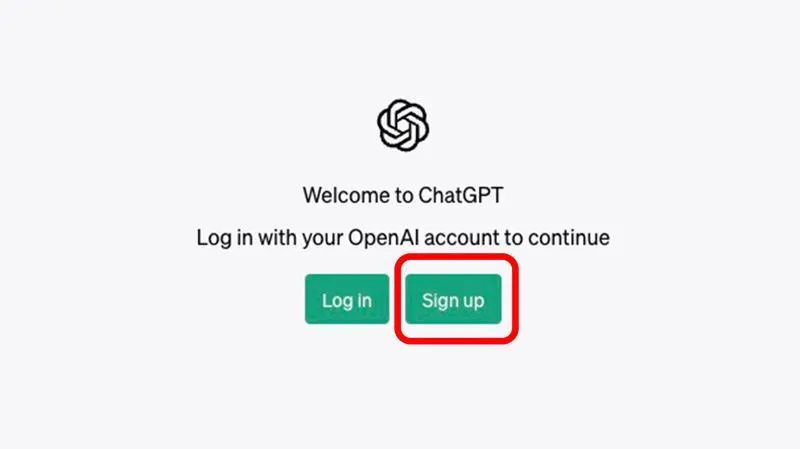
Step 2: Sign Up for a Free Account
Select the Sign Up option.
Depending on the available options, you can register using:
Your email address.
A supported Google account.
An Apple account.
Another supported sign-in method.
Follow the instructions to complete registration and any required verification.
Step 3: Open ChatGPT
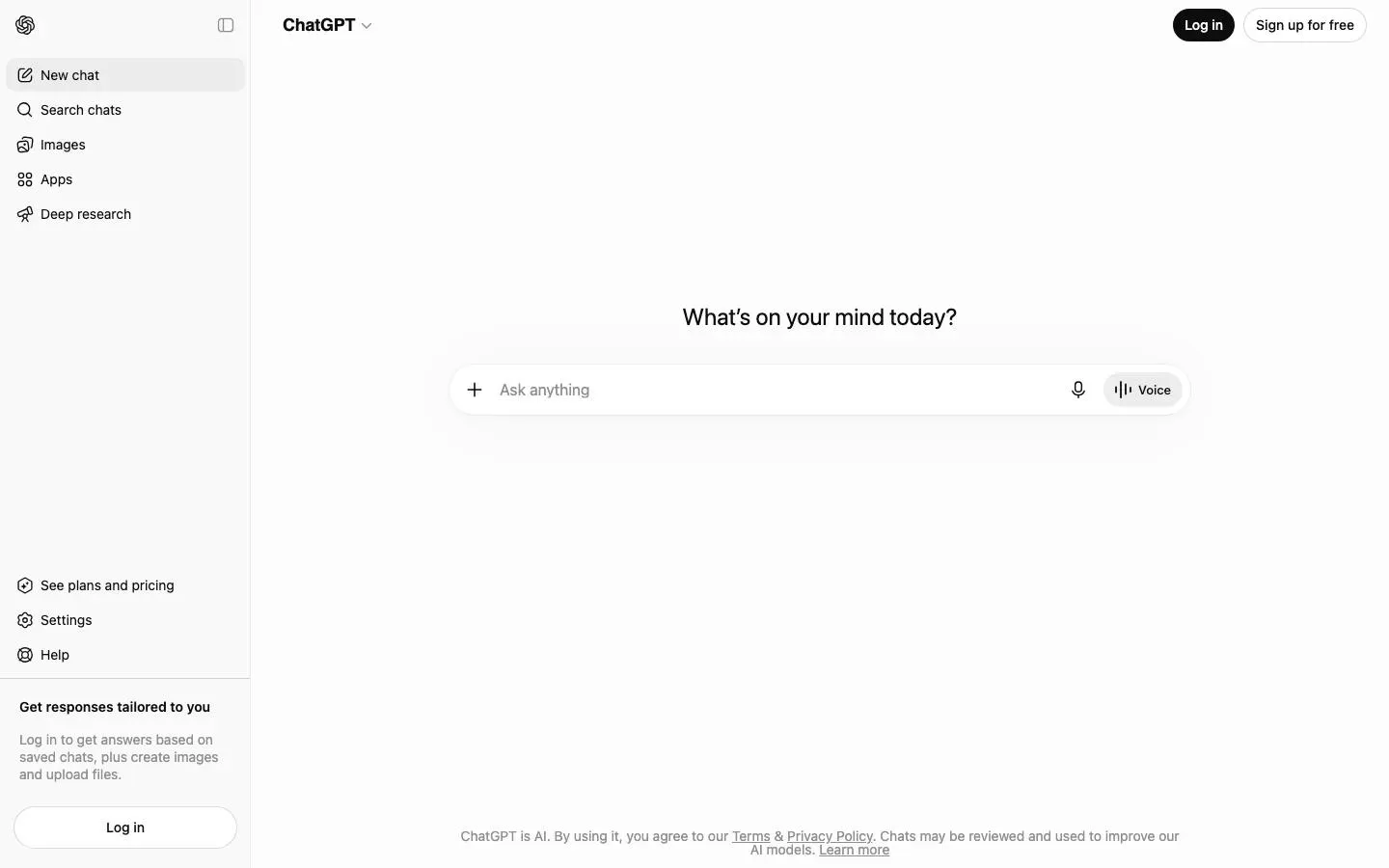
Once you're signed in, you'll see the ChatGPT interface.
You'll usually find:
A message box where you type questions.
A sidebar for previous conversations.
A new chat option.
Available tools and settings.
The layout may change as OpenAI updates the interface, but the basic process remains similar.
Step 4: Start Your First Conversation
Click the message box and type something simple.
For example:
"Hello ChatGPT! I'm a beginner. Please explain what you can help me with."
Press Enter or select the Send button.
That's it! You've started using ChatGPT.
Beginner tip: You may be able to try ChatGPT without signing in in supported regions. However, creating an account is useful for accessing your conversation history and account features.
3. How to Use ChatGPT: Understanding the Interface
Before exploring advanced features, let's understand the basic interface.
Although the design may change, most beginners only need to understand four things.
1. Message Box
This is where you type your questions or instructions.
For example:
"Write a professional email asking for a job interview."
2. New Chat
Use this option when you want to start a completely different conversation.
For example, you might use one chat for learning English and another for business planning.
3. Conversation History
When chat history is enabled and you're signed in, previous conversations can appear in the sidebar.
You can reopen an old conversation and continue working on the same topic.
4. Tools and Attachments
Depending on your account and available limits, you may find options to upload files, share images, use voice, generate images, or access other tools.
You don't need to understand every button immediately.
Start with ordinary text conversations. Explore other features when you need them.
4. How to Write Better ChatGPT Prompts
This is probably the most important skill for beginners.
A prompt is simply the instruction or question you give ChatGPT.
Better instructions generally lead to more useful answers.
Let's understand this with an example.
Bad Prompt vs. Good Prompt
Bad prompt:
"Write about technology."
This is too broad. ChatGPT doesn't know what type of technology, audience, or writing style you want.
Better prompt:
"Write a 500-word beginner-friendly article about how smartphones have changed everyday life. Use simple English, short paragraphs, and real-life examples."
The second instruction provides more useful information.
The Simple 4-Part Prompt Formula
You don't need to learn complicated prompt engineering.
Just remember these four elements:
Role: Tell ChatGPT what role to take.
Task: Explain what you want.
Context: Provide relevant background information.
Format: Explain how you want the answer.
Example:
"You are an experienced English teacher. Help me learn basic English grammar. I'm a complete beginner. Explain each rule in simple English with examples and short practice questions."
This gives ChatGPT a much clearer direction.
5 Ready-to-Use Prompts for Beginners
You can copy these prompts and use them immediately.
Prompt 1: Learn Something New
"Explain [your topic] in simple language. Assume I know nothing about it. Give me five real-life examples."
Prompt 2: Improve Your Writing
"Rewrite the following text in clear, natural, and professional English. Keep the original meaning but make it easier to read."
Prompt 3: Learn English
"Act as my English conversation teacher. Ask me one simple question at a time, correct my grammar, and explain my mistakes."
Prompt 4: Generate Ideas
"Give me 10 practical ideas for [your goal]. Explain each idea briefly and suggest which one is easiest for a beginner."
Prompt 5: Understand a Difficult Topic
"Explain [topic] step by step. Use simple words, examples, and a short summary at the end."
You can also tell ChatGPT to make its answers shorter, more detailed, more formal, or easier to understand.
5. 10 Practical Ways to Use ChatGPT for Free
Now let's explore the real value of ChatGPT.
You don't need to use every feature. Start with the tasks that solve your everyday problems.
1. Use ChatGPT for Learning and Education
ChatGPT can act as a personal learning assistant.
If you're struggling with mathematics, science, history, or another subject, ask it to explain the topic in simple language.
Example prompt:
"Explain photosynthesis in simple English. Use an everyday example and give me five questions to test my understanding."
You can also use it to:
Summarize study notes.
Explain difficult words.
Create practice questions.
Prepare for examinations.
Build a daily learning schedule.
Why it's useful: Instead of memorizing complicated explanations, you can ask follow-up questions until you understand the subject.
2. Write Emails, Articles, and Documents
Writing can take a lot of time, especially when you're unsure how to start.
ChatGPT can help you create:
Professional emails.
Blog post outlines.
Business proposals.
Product descriptions.
Reports and summaries.
Social media captions.
Example prompt:
"Write a polite email requesting a meeting with a client. Keep it professional, friendly, and under 150 words."
Remember to review and personalize important documents before sending or publishing them.
3. Learn English and Other Languages
You don't need an expensive language-learning course to start practicing with ChatGPT.
You can ask it to act as a language teacher.
Try this:
"Act as my English speaking partner. Start a simple daily conversation. Ask one question at a time and correct my mistakes."
You can also:
Translate sentences.
Learn new vocabulary.
Understand grammar.
Practice everyday conversations.
Improve sentence structure.
Useful tip: Don't just ask ChatGPT to translate everything. Ask it why a particular sentence is written that way. This helps you learn instead of simply copying answers.
4. Use ChatGPT for Business Ideas
If you're starting a small business, ChatGPT can help you organize your thoughts.
For example, you can ask:
"I want to start a small online business with a limited budget. Suggest five realistic business ideas and explain the basic steps for starting each one."
Other useful tasks include:
Brainstorming business names.
Creating marketing plans.
Writing product descriptions.
Preparing customer responses.
Creating promotional content.
Organizing business activities.
ChatGPT can help with planning, but it cannot guarantee that a business idea will be profitable.
Always research your market before investing money.
5. Get Help With Coding and Programming
ChatGPT can be especially useful for people learning programming.
For example, if you're learning JavaScript, you can ask:
"Explain JavaScript variables in simple English. Show me three examples and give me a small exercise."
If your code produces an error, paste the relevant code and error message.
Try:
"Explain why this JavaScript code is producing an error. Identify the problem and show me a corrected version. Explain the changes step by step."
It can help with:
HTML and CSS.
JavaScript and React.
Python programming.
SQL queries.
Debugging.
Understanding programming concepts.
Important: Always test generated code before using it in a live application. AI-generated code may contain bugs or security problems.
6. Search the Web and Research Current Topics
One useful feature of ChatGPT is web search.
Ordinary AI answers may not always contain the latest information. Web search helps ChatGPT look for relevant online sources when answering questions about current topics.
For example:
"Search for the latest developments in smartphone technology. Summarize the important changes and provide reliable sources."
You can use web search for:
Technology updates.
Product information.
Research topics.
Recent developments.
News summaries.
Learning resources.
Remember: Check the original sources, especially when the answer involves financial decisions, health, laws, or important facts.
7. Upload Files and Ask Questions
You don't always need to read an entire document yourself.
Depending on available tools and usage limits, ChatGPT can analyze supported uploaded files.
For example, upload a PDF containing study notes and ask:
"Summarize this document in simple English. Identify the five most important points and explain each one."
Other useful examples:
Summarize a PDF.
Review a document.
Analyze spreadsheet data.
Extract important information.
Explain an uploaded image.
Organize information from files.
Always check the extracted information against the original document when accuracy matters.
8. Create Images Using ChatGPT
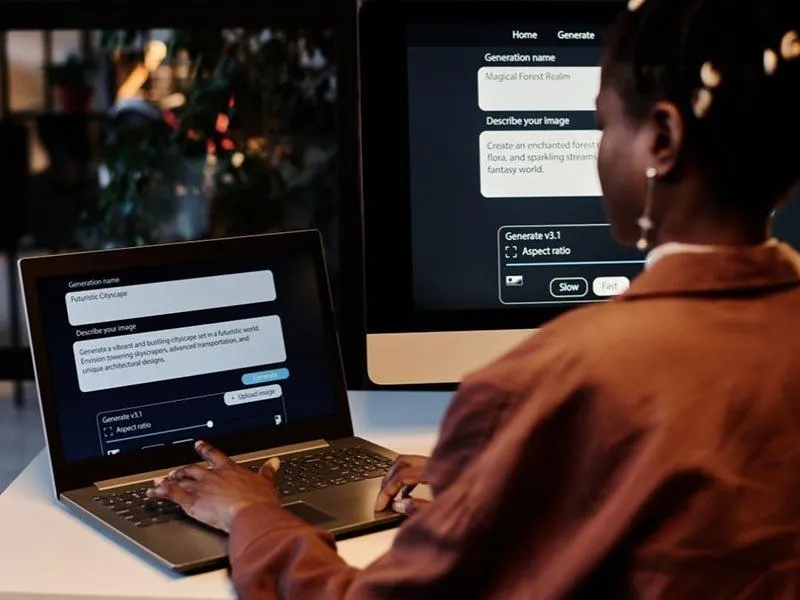
You can also use ChatGPT to create AI-generated images.
For example, you might want a birthday card, a simple illustration, or a promotional graphic.
Try this prompt:
"Create a clean, modern illustration of a small coffee shop on a rainy evening. Use warm lighting, a cozy atmosphere, and a professional advertising style."
You can also describe:
The subject.
Background.
Colors.
Image style.
Composition.
Aspect ratio.
Image creation is subject to free-plan usage limits. You may need to wait if you reach your available limit.
9. Use Voice Conversations
Sometimes typing is inconvenient.
Voice features allow you to communicate with ChatGPT using spoken language, where available.
For example:
"Help me practice speaking English. Ask me simple questions and correct my mistakes."
Voice conversations can be useful for:
Language practice.
Asking questions while doing other tasks.
Learning through conversation.
Practicing pronunciation and speaking confidence.
Voice availability and usage limits depend on your account and plan.
10. Organize Your Daily Life
ChatGPT can also help with ordinary everyday activities.
For example:
"Create a simple daily schedule for someone who works from 9 AM to 5 PM and wants to exercise, study, and spend time with family."
You can ask it to:
Create daily schedules.
Make shopping lists.
Plan trips.
Organize weekly tasks.
Prepare meal ideas.
Build personal learning plans.
It is not a replacement for your own judgment, but it can make planning easier.
6. ChatGPT Free vs Paid: Do You Really Need to Upgrade?
This is one of the most common questions beginners ask.
The answer depends on how frequently you use ChatGPT and what you need it to do.
You don't necessarily need a paid subscription to benefit from AI.
Here's a simple comparison.
Feature | Free | Paid Plans |
|---|---|---|
Everyday text conversations | Yes | Yes |
Web search | Available | Available |
File uploads | Limited | Higher limits |
Image generation | Limited | Higher limits |
Data analysis | Limited | Higher limits |
Voice | Limited | Expanded access |
Advanced tools | Limited access | More access |
Usage capacity | Lower limits | Higher limits |
The exact features and limits depend on the subscription and can change over time.
When Is ChatGPT Free Enough?
The free plan is a reasonable starting point if you:
Ask occasional questions.
Need help with writing.
Want to learn new skills.
Practice English.
Need basic research assistance.
Use AI for everyday productivity.
When Should You Consider a Paid Plan?
A paid plan may be worth considering if you:
Use ChatGPT frequently for professional work.
Regularly work with large files.
Need higher image-generation limits.
Often reach free usage limits.
Need more advanced tools and capabilities.
Our recommendation: Start with the free plan. Understand your actual needs first. Upgrade only when the limitations become a genuine problem.
Official comparison: ChatGPT Plans and Pricing.
7. 7 ChatGPT Tips Every Beginner Should Know
Knowing how to ask questions is important, but a few simple habits can make your experience much better.
Tip 1: Be Specific
Instead of asking:
"Tell me about computers."
Ask:
"Explain how a computer processor works in simple language. Use an everyday example."
Tip 2: Give More Context
Tell ChatGPT who the answer is for and what you're trying to achieve.
For example:
"I'm preparing a presentation for school. Explain climate change in simple English with five important points."
Tip 3: Ask Follow-Up Questions
You don't need to get everything right in your first prompt.
Try:
Can you explain that more simply?
Give me another example.
Make the answer shorter.
Explain the second point in more detail.
Tip 4: Ask ChatGPT to Change Its Answer
If the answer is too complicated, tell it:
"Rewrite this for someone who has never studied this topic."
Tip 5: Use Separate Chats for Different Tasks
Create different conversations for different projects.
For example:
English learning.
Business planning.
Coding help.
Article writing.
Personal productivity.
This makes your conversations easier to organize.
Tip 6: Verify Important Information
ChatGPT can sometimes produce incorrect information or misunderstand your question.
Check important facts using reliable sources, especially before making financial, medical, legal, or professional decisions.
Tip 7: Experiment With Prompts
Don't be afraid to try different instructions.
You can improve an answer by changing the tone, length, format, or level of detail.
The more clearly you explain what you need, the more useful the response can become.
8. Is ChatGPT Safe to Use for Free?
Generally, ChatGPT is designed with privacy and security controls, but you should still use it carefully.
One important thing beginners should understand is that free access does not mean you should share all your personal information.
Protect Your Personal Information
Avoid sharing:
Passwords.
Bank account details.
Credit card numbers.
Private identification documents.
Confidential business information.
Sensitive personal information.
Understand ChatGPT Data Controls
On personal accounts, you can control whether eligible conversations are used to improve OpenAI's models.
To review this setting:
Open ChatGPT.
Select your profile menu.
Open Settings.
Select Data Controls.
Find Improve the model for everyone.
Turn it off if you don't want new conversations used for model improvement.
You can also use Temporary Chat for conversations that you don't want to appear in your regular chat history.
Temporary chats are not used to improve OpenAI models while they remain temporary, although they may be retained for safety purposes for up to 30 days.
For more information, visit the OpenAI Data Controls Guide.
Our advice: Treat ChatGPT like an online service. Share only the information necessary to complete your task.
9. Common ChatGPT Mistakes Beginners Should Avoid
Many beginners make simple mistakes that lead to disappointing results.
Here are some common examples.
Mistake 1: Expecting Perfect Answers
ChatGPT is powerful, but it isn't always correct.
Solution: Verify important information before relying on it.
Mistake 2: Writing Very Short or Unclear Prompts
A vague instruction can produce a generic answer.
Solution: Explain your goal, audience, and preferred format.
Mistake 3: Copying Everything Without Reviewing
AI-generated content may contain errors, repetition, or incorrect information.
Solution: Review and edit important content before using it.
Mistake 4: Treating ChatGPT as a Search Engine for Every Question
Some questions require current information and reliable sources.
Solution: Use web search when researching recent events, prices, or changing information.
Mistake 5: Sharing Sensitive Information
Never assume that an AI conversation is the right place to store confidential information.
Solution: Use available privacy controls and avoid sharing unnecessary personal data.
10. Best Free ChatGPT Alternatives
ChatGPT isn't the only AI assistant available.
Depending on your needs, you can also explore other services.
Google Gemini
Google Gemini is Google's AI assistant. It can help with writing, learning, brainstorming, and other everyday tasks.
Claude
Claude is an AI assistant developed by Anthropic. It is useful for writing, explanations, document-related work, and reasoning tasks.
Microsoft Copilot
Microsoft Copilot is Microsoft's AI assistant, offering help with questions, writing, research, and productivity.
Which One Should Beginners Choose?
If you're new to AI, don't rush to subscribe to multiple services.
Start with ChatGPT's free plan and understand how AI assistants work.
If you have a particular task that ChatGPT struggles with, try another assistant and compare the results.
Different AI tools have different strengths, limitations, and free usage policies.
11. Frequently Asked Questions About Using ChatGPT for Free
Is ChatGPT completely free?
ChatGPT offers a free plan with everyday conversations and access to several AI tools. However, some features have usage limits, and paid subscriptions provide higher access limits.
How do I use ChatGPT without paying?
Visit chatgpt.com, create a free account, and start chatting. You don't need a credit card to start using the Free plan.
Can I use ChatGPT for free on my mobile phone?
Yes. ChatGPT offers official mobile apps for Android and iOS. You can also access it through your mobile browser.
Download only from official sources:
Can ChatGPT write articles for free?
Yes. You can ask ChatGPT to generate article outlines, drafts, introductions, summaries, and other written content. Free usage limits may apply to the tools and models you use.
Always fact-check and edit AI-generated articles before publishing them.
Can ChatGPT create images for free?
Yes. Free users can access image generation, subject to usage limits. Availability and limits may change.
Can I use ChatGPT for learning English?
Absolutely. You can use it to practice conversations, learn grammar, translate sentences, improve vocabulary, and correct writing mistakes.
Does ChatGPT always give correct answers?
No. ChatGPT can sometimes misunderstand questions or generate incorrect information. Always verify important facts using reliable sources.
Can I use ChatGPT without creating an account?
In supported regions, you may be able to use ChatGPT without signing in. However, creating an account provides access to additional account features and conversation history.
Can I use ChatGPT for business?
Yes. It can help with brainstorming, writing, customer communication drafts, planning, and analyzing information. However, you should review its output before using it for important business decisions.
What is the difference between ChatGPT Free and ChatGPT Plus?
ChatGPT Free provides access to everyday AI conversations and selected tools with usage limits. ChatGPT Plus offers higher limits and expanded access to additional capabilities. Check the official pricing page for the latest comparison.
Can beginners use ChatGPT without technical knowledge?
Yes. You can communicate with ChatGPT using ordinary language. You don't need programming skills or previous AI experience.
Final Verdict: Is ChatGPT Free Worth Using for Beginners?
Absolutely.
ChatGPT is a useful starting point for anyone who wants to explore artificial intelligence without paying for a subscription.
You can use it to learn new things, improve your writing, practice languages, research topics, organize daily activities, and explore creative ideas.
The biggest advantage isn't simply that ChatGPT can generate answers. It's that you can ask follow-up questions, request simpler explanations, and gradually improve the results through conversation.
However, remember three important things:
AI can make mistakes, so verify important information.
Free tools have usage limits, so understand what is available.
Your own judgment and creativity still matter.
Our recommendation: Start with one simple task today. Ask ChatGPT to teach you something new, help you write an email, or explain a topic you've always found difficult.
You don't need to become an AI expert to benefit from it. You just need to start asking better questions.
Have you tried ChatGPT's free version? Share your experience, favorite feature, or questions in the comments. Your feedback can help other beginners get started.
Official Sources and Further Reading
For accurate and updated information, refer to these official resources:
Editorial note: Features, model availability, and usage limits may change. Always check the official OpenAI documentation for the latest information.
About SamReview: SamReview publishes practical technology guides, software reviews, and beginner-friendly tutorials to help readers understand and use technology with confidence.
✍️ More from Nil Ratan Karmakar

ChatGPT vs Claude vs Gemini: Which AI Is Best in 2026?

Claude AI Review 2026: Features, Pricing, Claude Code & Real-World Limitations

ChatGPT Review 2026: Features, Pricing, GPT-6, Pros & Cons – Is It Worth Using?
Best VPN Services in 2026: NordVPN vs ExpressVPN vs Surfshark vs Proton VPN vs Mullvad
DeepSeek V4.1 Flash Review (2026): Is This 1M-Context AI Model Worth Using?
Reviews & Comments (0)
No comments yet. Be the first to share your thoughts!
Nil Ratan Karmakar
Nil Ratan Karmakar is a Software Specialist and Senior Reviewer at SamReview. With over 8 years of dedicated experience in the software industry, he specializes in testing and analyzing SaaS platforms, productivity tools, AI software, and mobile applications. Before joining SamReview, Nil worked as a software analyst, where he developed a deep understanding of user experience (UX), software architecture, and performance optimization. He is passionate about helping users find the right software solutions to boost their productivity and workflow. Outside of reviewing software, Nil enjoys exploring new tech trends and contributing to open-source projects.
Read Next
View All →
Best Laptops for Programming in 2026: Black Friday Deals, Prices & Reviews
Find the best laptops for programming in 2026 with Black Friday prices, regular price comparisons, savings, specifications, pros and cons.

Best Budget Laptops Under $500 in 2026
Find the best budget laptops under $500 in 2026. Compare Acer, ASUS, Lenovo and Chromebook options, with pros, cons and buying advice.

Best Laptops for College Students in 2026: 7 Top Picks
Find the best laptops for college students in 2026. Compare MacBooks, Windows laptops and Chromebooks for budget, battery life, engineering, and everyday study.

Best Black Friday TV Deals 2026: 7 TVs Worth Buying, Reviews
Find the best Black Friday TV deals 2026. Compare LG, Samsung and Sony OLED, QLED and Mini LED TVs, prices, pros, cons and buying options.