
Claude AI Review 2026: Features, Pricing, Claude Code & Real-World Limitations
Is Claude AI worth using in 2026? Explore its latest models, features, Claude Code, pricing, strengths, limitations, privacy, and alternatives.

Claude AI Review 2026: Is Anthropic’s AI Assistant Worth Using?
Claude has evolved far beyond a traditional AI chatbot. Developed by Anthropic, it now offers advanced reasoning, long-context analysis, coding assistance, research capabilities, and agentic tools designed to help people complete more complex tasks.
But is Claude actually worth using in 2026? Can it compete with ChatGPT and Google Gemini? And does its powerful Claude Code experience make it a better choice for developers?
In this independent Claude AI review, we examine its latest models, features, pricing, coding capabilities, privacy considerations, advantages, and limitations to help you decide whether Claude is the right AI assistant for your needs.
Quick Verdict: Is Claude AI Worth It?
Claude is a strong choice for people who prioritize thoughtful writing, complex reasoning, coding assistance, and working with large amounts of information.
Its biggest strengths are its natural writing style, long-context capabilities, Claude Code development tools, and growing agentic workflow ecosystem.
However, Claude is not perfect. Usage limits can interrupt demanding workflows, AI-generated answers still require fact-checking, and its native image-generation capabilities are more limited than those of some competing AI platforms.
Our verdict: Claude is worth trying, especially for writers, developers, researchers, and professionals who regularly work with complex information. Whether a paid subscription makes sense depends on how frequently you use its advanced features.
Claude AI at a Glance
Category | Details |
|---|---|
Developer | Anthropic |
Product | Claude AI |
Main purpose | AI assistance, reasoning, writing, research, and coding |
Latest model family | Claude 5.5 and 5.2 families |
Free plan | Yes |
Paid plans | Pro, Max, and Ultra |
Coding assistant | Claude Code |
Context window | Up to 1 million tokens on supported models |
Web access | Yes |
Image understanding | Yes |
Native image generation | Not a core native capability |
Platforms | Web, desktop, and mobile |
API access | Yes |
Best for | Writing, coding, research, and complex workflows |
1. What Is Claude AI?
Claude is an artificial intelligence assistant developed by Anthropic, an AI research and technology company.
The platform is designed to help users understand information, solve problems, write content, analyze documents, generate code, and work through complex tasks.
Unlike a simple question-and-answer chatbot, Claude increasingly supports workflows that involve multiple steps, connected tools, files, and longer-running tasks.
Its capabilities make it useful across several professional areas:
Content creation and editing
Software development
Document analysis
Research and summarization
Business planning
Data analysis
Technical problem-solving
Workflow automation
Anthropic emphasizes helpfulness, reliability, and AI safety in its model development approach.
However, Claude is still a probabilistic AI system. Its answers should not automatically be treated as verified facts.
2. Claude's Latest AI Models in 2026
One of the most important developments in Claude's ecosystem is its expanding model lineup.
As of November 17, 2026, Anthropic's official model documentation lists several models designed for different workloads.
Claude Fable 5.2
Fable 5.2 is designed for demanding reasoning and long-horizon agentic work.
It is intended for complex technical tasks where a workflow may require multiple steps, deeper analysis, and sustained problem-solving.
Claude Opus 5.5
Opus 5.5 is positioned as a powerful everyday model for long-running agentic coding and knowledge work.
It is particularly relevant to developers, researchers, and professionals working with demanding projects.
Claude Sonnet 5.5
Sonnet 5.5 focuses on balancing intelligence and speed.
For many users, this type of model offers a practical combination of performance and efficiency.
Claude Haiku 5.5
Haiku 5.5 is designed for fast, high-volume workloads.
It is suitable for tasks such as classification, information extraction, summarization, and routing.
Model comparison
Model | Main purpose | API input price per million tokens |
|---|---|---|
Fable 5.2 | Advanced reasoning and agentic work | $8 |
Opus 5.5 | Complex coding and knowledge work | $4 |
Sonnet 5.5 | Balanced speed and intelligence | $2 |
Haiku 5.5 | Fast, high-volume tasks | From $0.10 |
These are API token prices, not monthly subscription prices. Output tokens are billed separately.
Supported models have context windows of up to 1 million tokens, according to Anthropic's current documentation.
Our analysis: Claude's model lineup is useful because users do not need the most expensive model for every task. Choosing a model based on workload can help balance capability, speed, and cost.
3. Writing and Content Creation
Writing is one of Claude's most recognizable strengths.
Claude can help users create:
Blog posts and articles
Professional emails
Product descriptions
Marketing content
Business reports
Technical documentation
Website copy
Editing and rewriting drafts
One notable advantage is its ability to maintain a consistent tone across longer pieces of content.
For example, a writer can provide a draft and ask Claude to improve clarity, reorganize sections, remove repetition, or make the language more conversational.
It can also help transform rough ideas into structured outlines.
Where Claude performs well
Long-form content organization
Natural-sounding writing
Editing and rewriting
Maintaining context across multiple instructions
Explaining complex subjects in accessible language
Where users should be careful
Natural-sounding writing does not automatically mean accurate writing.
Claude may produce incorrect facts, unsupported claims, outdated information, or references that require verification.
For professional publishing, fact-checking and human editing remain essential.
4. Reasoning and Long-Context Analysis
Claude's long-context capabilities are particularly useful when working with large documents.
Users can provide substantial amounts of text and ask questions about the material.
Examples include:
Summarizing lengthy reports
Comparing multiple documents
Finding inconsistencies
Extracting important information
Reviewing technical documentation
Analyzing lengthy business materials
With supported models offering up to a 1-million-token context window, Claude can handle workflows that would be difficult to manage through short conversational exchanges.
However, a large context window does not guarantee perfect recall or accuracy.
Important conclusions should always be checked against the original source material.
5. Claude Code: A Powerful AI Coding Assistant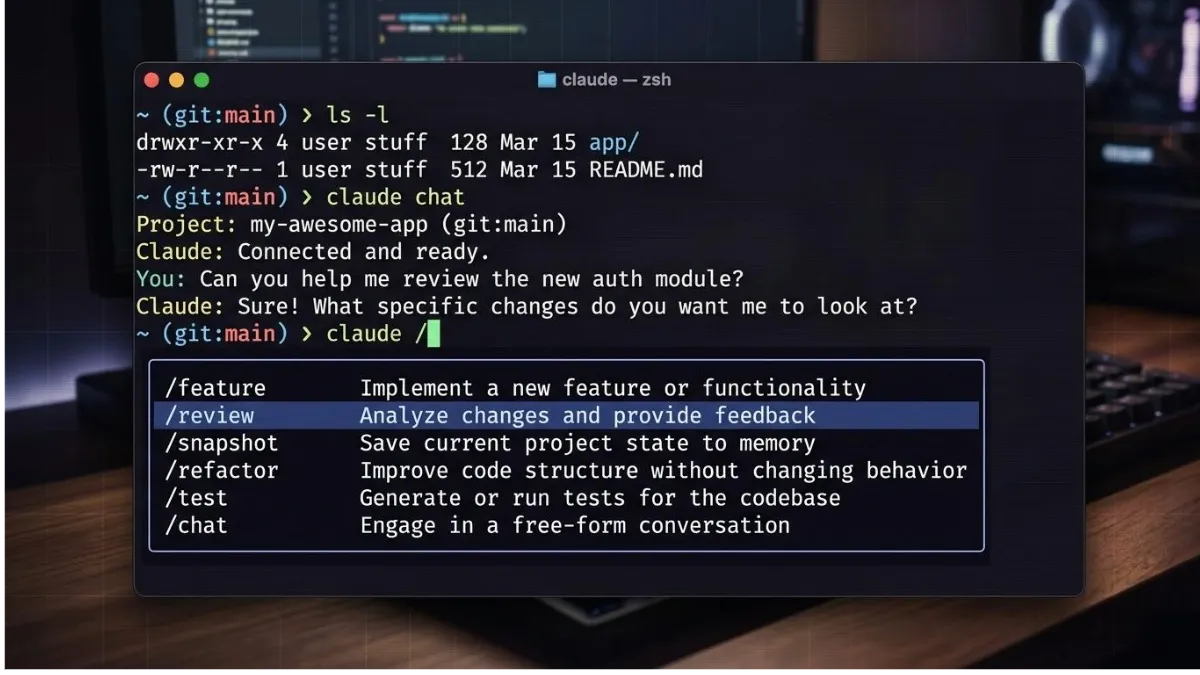
Claude Code is one of the most important parts of Anthropic's developer ecosystem.
Rather than functioning only as a chatbot that suggests code snippets, Claude Code can work within a development environment and assist with broader software engineering tasks.
It can help developers:
Understand existing codebases
Identify potential bugs
Refactor code
Write tests
Debug errors
Explain unfamiliar code
Work through multi-file changes
Automate repetitive development tasks
Claude Code Review
Anthropic also provides a dedicated Code Review workflow for eligible Team and Enterprise organizations using GitHub repositories.
The system uses multiple AI agents to examine code changes, verify potential findings, rank issues by severity, and post inline comments on pull requests.
Its workflow includes four main stages:
Find potential issues across the changes.
Verify candidate findings against the code.
Rank and remove duplicate findings.
Post findings and summaries to the pull request.
This can help development teams identify potential bugs and security problems earlier.
However, Anthropic explicitly warns that AI code review may miss bugs and vulnerabilities. A clean review does not prove that code is secure or error-free.
Our assessment: Claude Code is particularly interesting for developers who want assistance beyond isolated code generation. Its usefulness depends on the complexity of the project, the quality of instructions, and human verification.
6. Research, Web Search, and Information Analysis
Claude can assist with research by helping users explore topics, summarize information, and organize findings.
Its web-search capabilities make it more useful for questions that depend on information beyond its internal training knowledge.
Typical applications include:
Exploring new technologies
Summarizing online information
Comparing products and services
Researching business topics
Organizing source material
Creating structured reports
Still, web access should not be confused with independent verification.
Users should inspect original sources, especially when dealing with financial, legal, medical, or security-related information.

7. Claude Artifacts and Productivity Tools
Claude Artifacts allow users to create and interact with certain types of content within the Claude experience.
Depending on the task, this can include:
Interactive applications
Code demonstrations
Documents
Visualizations
Structured content
Prototypes
These capabilities make Claude useful for people who want to move from an idea to a working demonstration without immediately switching between several applications.
Claude's broader productivity ecosystem also includes tools and features for documents, slides, integrations, and project-based workflows.
Availability can vary by plan and feature rollout.
8. Claude AI Pricing in 2026
Claude offers several subscription options, including a free tier and paid plans.
Here is the current individual pricing shown on Anthropic's official pricing page.
Plan | Price | Best for |
|---|---|---|
Free | $0 | Casual users |
Pro | $20/month | Regular individual users |
Pro annual | $200/year | Users choosing annual billing |
Max | $100/month | Heavy users |
Ultra | $200/month | Very demanding workflows |
The annual Pro subscription works out to approximately $16.67 per month.
Is Claude Pro worth paying for?
Claude Pro may be worthwhile for people who regularly use Claude for writing, coding, research, and professional tasks.
The Free plan is a reasonable starting point for exploring the platform.
Max and Ultra are designed for users who need substantially more usage capacity.
However, paid subscriptions still have usage policies and limits. The amount of work you can complete depends on factors such as model selection, conversation length, and file size.
Before subscribing, check the latest plan details directly on Anthropic's official pricing page.
9. Privacy and Data Security
Privacy deserves particular attention when using any AI assistant.
Claude processes user-provided information to deliver its services. Users should understand how their data may be handled before uploading sensitive documents or confidential business information.
For consumer accounts, Anthropic's policy allows chats and coding sessions to be used for model improvement when users choose to enable that option, subject to its stated exceptions and policies.
Commercial products, including the Anthropic API, have different data-handling terms. Anthropic states that commercial inputs and outputs are not used for model training by default.
Users should also understand data-retention policies and account-level privacy controls.
Privacy recommendations
Review model-improvement settings.
Avoid submitting passwords or confidential credentials.
Be careful when uploading customer information.
Understand your organization's data policies.
Review the applicable retention and deletion terms.
Use appropriate commercial arrangements for sensitive business workflows.
Our assessment: Claude provides documented privacy controls and separate commercial data terms, but users should not assume that every plan offers identical privacy protections.
10. Claude AI Pros and Cons
Pros
Natural and structured writing capabilities.
Strong performance for complex reasoning tasks.
Large context windows on supported models.
Useful coding assistance through Claude Code.
Support for research and document analysis.
Artifacts and productivity-focused features.
Multiple models for different workloads.
API access for developers and businesses.
Cons
Usage limits can interrupt demanding workflows.
AI responses can contain factual errors.
No equivalent native image-generation offering to dedicated image-generation tools.
Advanced features may require paid subscriptions.
Heavy agentic workflows can consume usage quickly.
AI-generated code requires human review.
Some advanced capabilities have plan or organizational restrictions.
11. Claude vs ChatGPT vs Google Gemini
Claude competes with other major AI assistants, but each platform has different strengths.
Feature | Claude | ChatGPT | Google Gemini |
|---|---|---|---|
Long-form writing | Strong | Strong | Strong |
Complex reasoning | Strong | Strong | Strong |
Coding assistance | Claude Code | Coding tools | Coding tools |
Document analysis | Strong | Strong | Strong |
Image generation | Limited native offering | Available | Available |
Multimodal ecosystem | Growing | Broad | Broad |
Developer API | Yes | Yes | Yes |
Best suited for | Writing, reasoning, coding workflows | Broad AI assistance | Google ecosystem and multimodal work |
There is no universal winner.
Claude may be the better choice for users who prioritize long-form reasoning and coding workflows.
ChatGPT may be more suitable for users who want a broad collection of AI tools in one platform.
Gemini may appeal to users who work extensively within Google's ecosystem.
The best choice depends on the tasks you actually perform.
12. Who Should Use Claude AI?
Claude is particularly suitable for:
Writers and content creators
People who need assistance with long-form writing, editing, outlining, and content organization.
Software developers
Developers who want help understanding codebases, debugging, refactoring, and working with AI-assisted development tools.
Researchers and students
Users who regularly analyze large documents and need help organizing complex information.
Business professionals
People who need support with reports, planning, documentation, and structured problem-solving.
Small teams and independent builders
Users who want to accelerate repetitive knowledge work and development tasks.
Who might not need Claude?
Claude may not be the best primary choice for people who mainly want native image generation, video generation, or a broad entertainment-focused multimedia experience.
Users who only need occasional simple answers may also find the Free plan sufficient.
13. Is Claude AI Better Than ChatGPT?
The answer depends on your priorities.
Claude has a strong position in writing, reasoning, long-context analysis, and coding workflows.
ChatGPT offers a broader collection of tools and multimodal capabilities.
Rather than choosing based on popularity or marketing claims, users should compare both assistants using their own real tasks.
For example, a developer should test debugging and code-review workflows, while a writer should compare editing quality and consistency.
14. Final Verdict: Should You Use Claude in 2026?
Claude has developed into a serious AI productivity platform.
Its combination of writing, reasoning, document analysis, coding assistance, and agentic capabilities makes it useful for a wide range of professional tasks.
Claude Code is particularly noteworthy because it extends AI assistance into software development workflows.
However, Claude is not a replacement for human expertise. It can make mistakes, usage limits matter, and important outputs still require verification.
For casual users, the Free plan is a sensible starting point. Regular professionals may find Pro useful, while Max and Ultra are more relevant to users with demanding workloads.
Our final recommendation: Claude is worth trying if your work involves writing, research, software development, or complex problem-solving. It is a capable AI assistant, but the best subscription is the one that provides measurable value for your actual workflow.
Frequently Asked Questions
1. Is Claude AI free to use?
Yes. Claude offers a free plan with limited usage. Paid subscriptions provide additional usage capacity and features.
2. Is Claude better than ChatGPT?
Neither is universally better. Claude is particularly attractive for writing, long-context reasoning, and coding workflows, while ChatGPT offers a broader multimodal toolset.
3. What is Claude Code?
Claude Code is Anthropic's AI coding assistant. It helps developers understand, modify, debug, and work with software projects.
4. Can Claude analyze PDFs and documents?
Yes. Claude supports document-based workflows and can help summarize, extract, compare, and analyze information from supported files.
5. Does Claude generate images?
Claude supports image understanding, but it does not provide the same native image-generation experience as dedicated image-generation platforms.
6. How much does Claude Pro cost?
Claude Pro is $20 per month with monthly billing or $200 per year with annual billing, according to the official pricing page.
7. Is Claude safe for business use?
It offers commercial products and documented data-handling policies. Businesses should review the relevant privacy, security, retention, and contractual terms before using sensitive information.
8. Can Claude write code?
Yes. Claude can generate, explain, debug, and refactor code. Claude Code provides a more integrated development workflow.
9. Does Claude have usage limits?
Yes. Usage limits vary by subscription, model, conversation length, and workload.
10. Who should use Claude AI?
Writers, developers, researchers, professionals, and teams that benefit from AI-assisted reasoning and knowledge work may find Claude particularly useful.
About This Review
This review was prepared by the SamReview Editorial Team using publicly available product documentation, pricing information, independent reviews, and user-feedback sources.
Our evaluation distinguishes official product capabilities, third-party experiences, and editorial analysis.
We do not treat vendor performance claims as independent benchmark results. Features, model availability, pricing, and usage limits may change over time.
Editorial update: November 17.2026.
Affiliate disclosure: This article contains no affiliate links or paid product-placement recommendations.
Editorial policy: Our goal is to provide readers with balanced, useful, and transparent technology reviews.
✍️ More from Nil Ratan Karmakar

How to Use ChatGPT for Free (2026): Complete Beginner's Guide
ChatGPT vs Claude vs Gemini: Which AI Is Best in 2026?

ChatGPT Review 2026: Features, Pricing, GPT-6, Pros & Cons – Is It Worth Using?
Best VPN Services in 2026: NordVPN vs ExpressVPN vs Surfshark vs Proton VPN vs Mullvad
DeepSeek V4.1 Flash Review (2026): Is This 1M-Context AI Model Worth Using?
Reviews & Comments (0)
No comments yet. Be the first to share your thoughts!
Nil Ratan Karmakar
Nil Ratan Karmakar is a Software Specialist and Senior Reviewer at SamReview. With over 8 years of dedicated experience in the software industry, he specializes in testing and analyzing SaaS platforms, productivity tools, AI software, and mobile applications. Before joining SamReview, Nil worked as a software analyst, where he developed a deep understanding of user experience (UX), software architecture, and performance optimization. He is passionate about helping users find the right software solutions to boost their productivity and workflow. Outside of reviewing software, Nil enjoys exploring new tech trends and contributing to open-source projects.
Read Next
View All →
Best Laptops for Programming in 2026: Black Friday Deals, Prices & Reviews
Find the best laptops for programming in 2026 with Black Friday prices, regular price comparisons, savings, specifications, pros and cons.

Best Budget Laptops Under $500 in 2026
Find the best budget laptops under $500 in 2026. Compare Acer, ASUS, Lenovo and Chromebook options, with pros, cons and buying advice.

Best Laptops for College Students in 2026: 7 Top Picks
Find the best laptops for college students in 2026. Compare MacBooks, Windows laptops and Chromebooks for budget, battery life, engineering, and everyday study.

Best Black Friday TV Deals 2026: 7 TVs Worth Buying, Reviews
Find the best Black Friday TV deals 2026. Compare LG, Samsung and Sony OLED, QLED and Mini LED TVs, prices, pros, cons and buying options.